v3.0.0-beta.44: Storyteller has a new aligner, and it's FAST

Heya!
Okay I know what you're thinking: "There's a v3??". Yes, sorry, we didn't really
announce it anywhere other than
our Discord server (do join!), but if that's
the main thing you take away from this you can install it using the
v3.0.0-beta tag! More to follow on that soon!
But don't mind that: we want to talk about our new alignment process!
- We have a new CTC forced alignment pipeline which produces much more accurate alignments
- That pipeline can use two groups of models, MMS and Quartz/Citrinet
- The Quartz/Citrinet variants can be up to 20 times faster than even the most highly optimized versions of the previous Whisper based transcription
- It is available in Storyteller
v3.0.0-beta,@storyteller-platform/ghost-story@^0.3.0and@storyteller-platform/align@^0.2.0 - Maybe even faster in the future! Try it out now!!
How to try it out
Okay before I get into the nitty gritty 80% of you aren't interested in, here's how to use it in Storyteller right now.
- Be sure to be on the latest version of Storyteller,
web-v3.0.0-beta(.44 at the time of writing). You can use the old schema for using gpu accelerated versions as described here. So for NVIDIA GPU acceleration you would want to useweb-v3.0.0-beta-cuda-13.1.0as your image tag,web-v3.0.0-beta-rocmfor AMD etc. - You will be confronted with this nice new prompt:
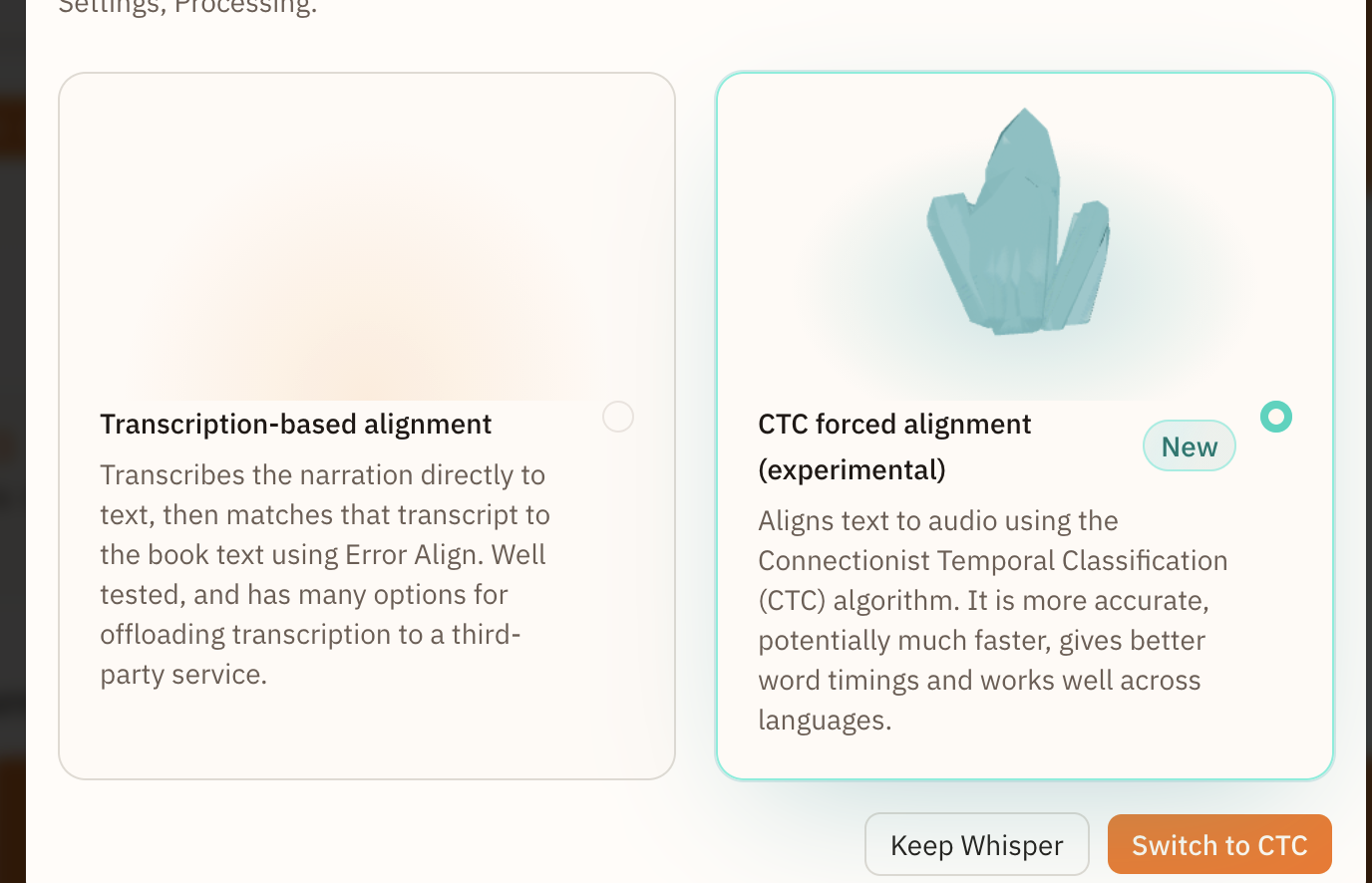 Pick CTC based alignment!
 - Go to align a new book (or an existing one)! We highly recommend starting from scratch, this will make sure you are fully able to use the new Alignment Report (documentation coming soon!)
Now you will have two ways to run the CTC aligner:
- Run QuartzNet/MMS on this server.
- If you are running on a non-CUDA hardware-accelerated image (i.e.
-rocm,-vulkan, or-sycl) you should pickGPU (WebGPU). - If you are on a CUDA image, pick CUDA (duh)
- Else, pick CPU (or if any of the above don't work)
- Run QuartzNet/MMS on another device using
ghost-story!
- Pick "On Another Server"
- See the documentation for more
information on how
ghost-storyused to work. We will create better documentation soon, so we are assuming you are somewhat aware of the idea. TL;DR: you want to do this when you are running Storyteller on a low powered device, or on a Mac where Docker cannot access the GPU. - Run
npx @storyteller-platform/ghost-story@latest serve --api-key <some api key>
- Fill out the API key and the server URL. See the above documentation for info on what the URL should be
- Let er rip!
Nitty gritty
Spurred on by this MR from community member Justus, the lead Storyteller developer, [Shane], recently added a whole new alignment pipeline to Storyteller!
He already wrote a great blog post about how it works, which you should read first!
... No I'm not going to summarize it here, just read his excellent blog post! It has animations!
For this article, the only thing you really need to know is that instead of what Storyteller was using before, namely transcribing the audio directly to text using e.g. Whisper, we now transcribe the audio to "emissions", which are 20ms frames of probability scores for each of the possible characters in the alphabet (although we'll get back to that alphabet part). The model that we had been using is called MMS (Massively Multilingual Speech), developed by Meta in 2023.

Then we do some complicated math to figure out where this matches up with the actual chapters in the book, and do some even more complicated math to align these emissions with the actual words in the book. The result: we can now much more easily find where in the book the audio is coming from, and the actual timestamps of the audio within the book are much more accurate (which will allow us to e.g. do word-level highlighting in the future!). As a bonus: MMS, being "Massively Multilingual", works with >1000 languages! (didn't even know there were that many!)
"Okay Thomas", I hear you whimper, "but if that's all so cool and great and Smoores already wrote a blog post about it, why do I need to sit through your half-assed attempt to summarize it (which you said you weren't going to do)?!". Wow okay harsh but fair.
There was one issue with the above, namely: it just wasn't as fast for people (like me!) who were specifically using their MacBook to do transcriptions. The previous model we were using, Whisper, specifically the cross platform whisper.cpp implementation, had a bunch of hardware specific optimizations for Apple Silicon (and other hardware) that are hard to replicate using the cross-platform runtime we use for MMS, ONNX, which you can think of as sort of a generic middleware for running Machine Learning code that handles executing the same model on different hardware. By contrast, Whisper.cpp is a specific implementation of a single model (okay, 2 now, they also support Parakeet) optimized for different kinds of hardware. Hard to compete with that!
The standard way to measure the speed of an ASR (automatic speech recognition) process is the Realtime Factor (RTF). This is the amount of time it takes to transcribe the audio, divided by the total duration of said audio.
This however almost always gives numbers < 1 (e.g. ), which is kind of annoying to read. So we will use the opposite of that, call it . If a 20 hour audiobook takes 1 hour to transcribe, we will say it's .
Anyway, some comparisons. We will use the first chapter of Moby Dick as a reference point, which is ~24 mintues long. All of these are measured on my Macbook Pro M1 Max with 64 GB of RAM, full blast, after a run of warmup.
For me, it was specifically that 220x number that I had gotten so used to.
Okay, now let's see Paul Allen's Transcription Model how MMS fares.
Oof. While quite decent, especially for it's accuracy, I must admit that in
secret Jess (our lovely product manager) and I were somewhat saddened we had to
give up our very very fast tiny.en. What's more: this model drew MUCH more
heavily on the GPU. My M1 Max has quite a lot of spare GPU, so it's still quite
fast (slightly faster than tiny.en p=1), but for Jess, who runs her server on an
M4 Mac Mini, things were looking much more dire.
This is because, due to the specific hardware optimization in Whisper.cpp, it was running using Apple's CoreML framework, which is able to split the load between the CPU, GPU, and Neural Engine on Apple Silicon. In contrast, we run MMS by using ONNX's WebGPU Execution Provider, which uses Metal (Apple's equivalent of DirectX/Vulkan), which only runs on the GPU.
But, this was on the same order of execution speed as p=1 Whisper, so surely
we could parallelize it a bit right? Right??
No, sadly not. MMS (or ONNX) by default is extremely adapt at using all available GPU power. Apple is normally extremely loathe to spin up the fans on Macbooks, to the point where if I want to stress test my laptop I need to run a separate program to turn up the fans to 100% to get consistent results. When running MMS on a full book however, wowza, the fans are easily pinned to 80% max (unheard of!) and GPU is 100% for the full duration of a transcription! There's really no way to squeeze any more perfomance out of this setup.
...But what if we changed the setup?
Down the rabbit hole
FP Quantization
The first thing you may notice in the "Notes" section of the table above is that
fp32 number. This stands for "floating point 32bits", which means that the
model uses
32bit floating point numbers
for its calculations, weights, etc. It's the standard size for models and has
the highest precision usually. This roughly means it can reliably store 7
decimal digits with some accuracy.
A common "trick" to make models faster/use less memory is to make it use a lower
precision representation. What if we used fp16 instead? This will only result
in 3-4 decimal digit precision.
Okay okay not bad! You might be worried that we are losing some precision in the output (those probability values we talked about!), and you would be right, but, as we will see, the new aligner is so good this basically doesn't matter (the difference is a few percent anyway).
Theoreticaly we could go even lower to int8 quantization, which would make
the model weights basically have no significant digits at all. This proved to be
too inaccurate however.
Hope
So is this all we can squeeze out of MMS? Not quite! Remember when we talked
about whisper.cpp being able to leverage CoreML, Apple's specific Machine
Learning platform? Well turns out (confusingly), Apple has another ML platform
called MLX12. Someone has ported
MMS (and a whole bunch of other models)
to MLX. Shane ported that to make it work for our needs, so let's see how it
does!
😳 Wowza, that's a spicy meatball model!
Hmm, however, when we tried to align the book with these numbers, there turned out to be a bug in node-swift (which as I'm writing this has been fixed 4 hours ago!!) that counted only 1/4 of the bytes coming in. After adjusting for that, we get some more down to earth numbers
Still excellent!!
A weaker more sensible man would have given up here and accepted this
outcome as the best we could do. And admittedly it's pretty good! However, there
were two things bugging me:
- This model still churned the hell out of my laptop, getting extremely hot to the touch. I knew that, if we wanted to really make this work, we needed to put some limiters on it, which would pull down that number considerably.
- While I had hella success, Jess' Mini was less lucky. While faster, MLX still mostly relied on the GPU, which a Mac Mini just does not have that much off.
- This Apple specific solution was not really generalizable to other platforms.
Searching for gems
Now fully bitten by optimization fever, I spent a weekend scouring for possible solutions to speed this thing up. Luckily, the output of MMS isn't super unique, so I thought "there must be some other CTC model that outputs the same thing?"
Specifically, we need a model that outputs single character probabilities (ideally in 20ms frames but beggars can't be choosers) in Latin script.
The most obvious place to look is MMS' dad: Wav2Vec2, developed in 2020 by Meta (then Facebook still). MMS also a model trained using the Wav2Vec2 framework. Alas, Wav2Vec2 was not a good fit as
- It was basically as big (~300m params), and therefore roughly as slow
- It only worked in English!
It only working in one or more specific languages wouldn't be that much of a
dealbreaker (after all Whisper "only" technically works in 100 languages, of
which ~30 have low enough WER (word error rates) to be usable), plus there was
this specific fast path using the .en models.
But finding... Quartz?
After A LOT of digging, I did find one lil model: NVIDIA's Quartznet, released in Spring 2020. It was much harder to find resources or discussion on it, possibly because it seems to have been completely overshadowed by Wav2Vec2 releasing shortly after, their papers having ~450 vs ~12000 citations respectively.
It's impressively tiny! The model we'll be looking at, QuartzNet-15x5, only
has 18.9M parameters!
* We'll come back to that...
For once, bigger number is not better here, as model size closely correlates with transcription speed.
Okay, cool, let's see how well it does. From now one we'll be benchmarking an entire book, namely this LibriVox recording of Moby Dick. It's ~24 hours and 44 mp3 files, which will provide a slightly more accurate representation of the... difficulties we'll run into later.
Pretty good! Three times faster than MMS using the same settings. But this is running into the same issue we had with MMS, namely that it's running in this generic ONNX runtime, which isn't that optimized for Apple Silicon.
Luckily this model is not very complicated. It needs three parts:
- The model weights converted from ONNX to MLX. We already needed to do this for MMS and while not trivial, there are many off the shelf solutions
- An MFCC frontend. Something that converts the incoming raw audio samples into mel spectrograms (MFCCs): basically a "human hearing"-optimized representation of the audio in 20ms slices
- The model runtime. Given that the model is EXTREMELY simple, it can be implemented in 100 lines of swift
Luckily I know a "guy" who's pretty good at one-shotting neural network implementations, so voila.
Let me just start with the final result:

I, uhh.... That can't be right. Surely we've just added the same kind of error we had for the MMS MLX port right?
...
Nope! Those are real numbers baby. Holy shit. As a comparison: just
converting/decoding the source mp3s into raw audio with ffmpeg, one file after
the other, takes 40 seconds for this book. The whole transcription took 69
(nice).
That's SO much faster than the ONNX runtime. How?
It tooks quite a lot of steps to get here, but unfortunately I ran out of energy to write this! I owe you one.
See here the result of the progression
Downsides
Remember that *?
Unfortunately, QuartzNet is not a very general model. Only the following languages are supported:
- 🇸🇦 Arabic
- 🇦🇲 Armenian
- Catalan
- 🇬🇧 English
- 🇫🇴 Faroese
- 🇩🇪 German
- 🇫🇷 French
- 🇮🇸 Icelandic
- 🇮🇹 Italian
- 🇯🇵 Japanese
- 🇰🇿 Kazakh
- 🇲🇹 Maltese
- 🇨🇳 Mandarin
- 🇵🇱 Polish
- 🇵🇹 Portuguese
- 🇷🇺 Russian
- 🇪🇸 Spanish
If you pick any other language, we will fall back to using MMS.
We plan on supporting more languages in the future! For that we likely will need your help to try and fine-tune the English model. Please let us know if you are interested in helping out on our Discord.
Current status
QuartzNet has performed so well in our tests that we now use it as the default model if you language is any of the above supported languages!
If you are using any other language, we will fall back to using MMS.
Gotta go even faster!
With all these speedups, we are in the incredible position that parts of the alignment process we used to handwave away as "neglible" compared to inference time now suddenly start to matter!
There are three things we can still optimize, in each of the steps of the transcription process (which are, to remind you: transcoding/splitting the audio -> transcribing the audio -> aligning the audio)
Transcoding (to do)
This can at the moment take by far the most amount of time! If you choose to transcode your books into, say, the extremely well optimized OPUS codec, this may run up to 10 times slower now than the actual transcription step!
Unfortunately, unless someone invents a way to run audio transcoding on the GPU, we are stuck with more boring solution, namely: not doing the transcoding at the same time as aligning.
We will in a future (post v3 stable release) update add the option to transcode your audiobooks on ingestion. For those of us not particularly picky about the source format, this can save a ton of space, as an OPUS transcode of a 20hour AAC encoded .m4b can easily take it from 1gb to 300mb!
Another thing to look forward to is, potentially, not having to duplicate your audiobooks! Currently the only output for the alignment process is an EPUB 3 with Media Overlays, including all the audio. This will need to be kept on disk next to your other books, boo!
We will likely offer ways to basically only construct the full EPUB3 at download time, so you can keep the alignment data separately. Up until now this was too tricky, as we needed to chop the audio into reasonably sized chunks for Whisper to be able to process them. Since now the chunks need to be even smaller (25/38), we needed to find a different way to map from the source audio to the audio in the book anyway.
No promises on the timeline for this "no-split" version however!
Anyway, being able to "skip"/defer this step could likely more than half your total alignment time if you don't use the "default" transcoding option. Neat!
Batching/decoding (done!)
Early testers mentioned seeing something strange... Their GPU was only showing roughly 25% utilization! While they were still getting a pretty nice speedup, wasn't I complaining above that my laptop got so hot I couldn't touch it?
Yes! However, that was only true on Apple Silicon at the time. The default runtime uses ONNX, which, sadly, seems to be running the model synchronously! That sentence should strike fear into the heart of any JavaScript enthousiast: JavaScript is a single threaded language, so any synchronous operation will block any other operation from running on that same thread. While we run the entire alignment process in a separate thread (a Worker) so that you can still, like, actually use Storyteller while you are aligning a book, we don't (yet) run the inference step in a separate thread from everything else.
This wasn't really a problem with the MMS model, since it's relatively relatively slow and so waiting on the model to finish processing a chunk (which we need to do anyway) would be the longest part of the transcriptin step anyway. After obtaining the Quartznet Chaos Emerald however, suddenly the transcription step is half split between turning the chunk into raw audio (~ a WAV file) and waiting for the model!
We were basically doing something like this:
track 1 [decode ][model ] track 2 [decode ][model] track 3 [decode... time
--------------------------------------------->
Model inference is often done on the GPU, while audio decoding is done on the CPU, so of course you would think "ah let's just do a bunch of that decoding while we wait for the model to be done!" Good idea!
I wanted to do something like this, maximize the amount of time the CPU is doing something useful while the model is busy.
track 1 [decode ][model ] track 2 [dec] [model ] track 3 [dec] [model ] track 4
[dec] [model ] time --------------------------------------------->
Unfortunately, I was testing that with our MLX models, which do run asynchronously meaning they leave some gaps for the CPU to be like "hey btw there's some stuff i'm done with". With ONNX, no bueno: while we are cleverly batching the decoding of audio in the background, when we try to push it into the model, try as we might, we cannot progress the pushing of the decoded audio chunk into the model, because it's too dang busy!

So instead it turned into this again:
track 1 [decode ][model ] track 2 [dec][model ] track 3 [dec][model ] time
--------------------------------------------->
But actually less efficient than before, because rather than our simple one at
a time pipeline I was trying to be too clever. We were using
ffmpeg-stream, a library that
wraps ffpmeg in a node-friendly streaming API. That way we didn't have to
muck about with loose files and raw calling ffmpeg: nice! Well, not nice,
because this is what was causing that blockage in the end. Back to the drawing
board.
There's one more issue with the process above: we are still decoding the entire track at once. So even if the above would work, it still takes some time for the first chunk to actually get to the model (even if not very long).
Fforce feeding
Okay, taking stock of what we know:
- The decoding of the audio needs to happen outside of the main event loop (because of ONNX)
- Ideally we do not want to have to wait for the entire audio file to be decoded before we can start the model inference, as the model can only take 25/38s chunks at a time anyway.
- Ideally we want the decoding to happen in parallel
Solution: break stuff up into more steps. First, we chop up our existing audio into a bunch of smaller, max 5 minute chunks.
track 1 (18:00) -> [1A ][1B ][1C ][1D] (5+5+5+3 minutes) track 2 (15:00) -> [2A
][2B ][2C ] (5+5+5 minutes) track 3 (08:00) -> [3A ][3B] (5+3 minutes)
We then spawn ffmpeg processes (which is configurabl, for now we auto pick
ffmpeg 1 [1A ][2A ][3B ] ffmpeg 2 [1B ][2B ] ffmpeg 3 [1C ][2C ] ffmpeg 4 [1D
][3A ] model [1A][1B][1C][1D][2A][2B][2C][3A][3B] write ^1 ^2 ^3 time
--------------------------------------------------->
Importantly: we need to write the output to a file, and not just try to keep it in memory. This is because (say it with me) the ONNX model run is synchronous etc.
So this step is a lot more IO intensive than before. We need some more data points to see if we should have add a complete in-memory version anyway, but the results so far are looking good!
Aligning(to do)
Finally, the last step: actually aligning the audio to the text! Again, see Shane's excellent post on this.
I won't go into too much detail (this post is already too long!), but we implemented one interesting speedup over the original implementation.
The Viterbi align step is roughly one reaaaallly long loop, going over all of the data we have calculated during the transcription step. To give you an idea of how long it is: we are concerned with nanosecond differences per iteration. We're going over BILLIONS of cells. One speedup we found made the iteration speed go from to , which resulted in a roughly 2x speedup of the entire alignment process! (From ~30 seconds to ~15 seconds for a long and complex chapter)
We had this step
const TOKEN_SCORE = -3;


for(...){
  //
  currScores[s] = (token === STAR ? TOKEN_SCORE : scores[token]) + best
  //
}
Turns out that V8 (the JavaScript engine that Node uses) finds it very hard to
optimize this kind of branch. Specifically, conditionally selecting a token from
typed Float32Array or selecting a constant was something not easy to optimize.
By changing this to (not the actual code, but basically)
const TOKEN_SCORE = new Float32Array([-3]);

for(...){
  //
  currScores[s] = (token === STAR ? TOKEN_SCORE[0] : scores[token]) + best
  //
}
It already went from to per loop! Which is crazy!
Further aligment improvements
Unfortunately there is only so much extra speed we can get out JS. There are two next steps we can and will take to speed up the final step:
- Rewrite (parts of) the alignment algorightm in Swift. Early tests show the main loop to go from to per loop. Nice!
- Parallelize the alignment as far as we can. This can make the main loop go to ~ per loop. Great!
What's next?
Sleep. And... a way to use this model to offload the transcription step to a
different device using ghost-story!
That is now also possible! Use
npx @storyteller-platform/ghost-story@latest serve --api-key <some api key>
to spin up a CTC emission server, and configure it in your Storyteller settings.
Have fun!